 |
Using Bar Chart Software to make Cashier’s job simple
It is common practice in banks, to appoint cashiers, who dole out cash, using currency notes of different denominations. Usually, it is difficult to find Currency Notes, which totals to exact Amount, the customer demands. I am proposing a method to make cashier’s job, quite easy using a Bar Chart Software.
Existing method
Let us first get into the existing method, banks are using. For every transaction, cashier has to put denominations of each note in the existing Software, to total up to the Amount, the customer demands.
For example,
If the Customer needs INR 25,500, Cashier has to find the currency notes available with him, to total up to INR 25,500 (2000 notes - 12 Numbers, 1000 notes - 1 Number, 500 notes - 1 Number)
2000*12 Notes = 24,000
1000*1 Note = 1000
500 * 1 Note = 500
Total Amount = INR 25,500
Issues in Existing Method
The issue with existing method is Cashier will not have enough high denominations (2000 notes), to give it to every Customer. Usually, he chooses mixture of denominations available with him. Another issue Cashier faces is that, he has to calculate all denominations to be fed to the system. Since, cashier chooses denominations all by himself, from his available notes, Existing Software only counts the total. It does not assist the Cashier, to count the number of Currency Note denomination, which totals up to the Exact Amount.
For example,
Consider, cashier has to give cash of INR 25,500. But he has only 1000 notes and 500 notes. So, he has to choose currency notes, as described below.
1000*25 Notes = 25,000
500*1 Note = 500
Total Amount = INR 25,500
Here, Cashier has to calculate, denominations of 1000 Rupee Notes and 500 Rupee notes, all by himself. Existing Software, just calculates whether total Amount is INR 25,500 or not.
Proposed Bar Chart Software
The proposed software contains Bar chart with two vertical fields. First represents the Number of Notes Available in a particular denomination. Second represents the Number of Notes Chosen, as selected by the Cashier. This Number of Notes Chosen is dragged up and down, within the Number of Notes Available upper cut-off.
Explanation by Example
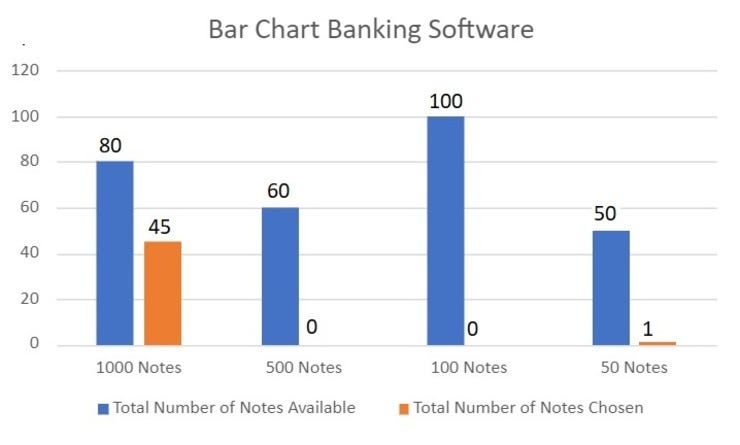
Consider, Cashier has to give cash of INR 45,050. This amount has to be filled with 1000, 500, 100 and 50 denomination notes. First, the vertical bars calculate maximum No. Of 1000 notes, which can be accommodated. I.e., 45 Notes of 1000 denominations, which totals to INR 45,000. Then, it goes to 500 notes, 100 notes, and at last 50 denomination notes. Since, balance amount is INR (45,050 – 45,000 = 50) only one note of 50 Note is accommodated.
As Illustrated in Figure 1.
 |
| Figure 1. Bar Chart Software |
Consider, that Cash drawer holds, 80 notes of 1000 denomination, 60 notes of 500 denomination, 100 notes of 100 denomination, 50 notes of 50 denomination.
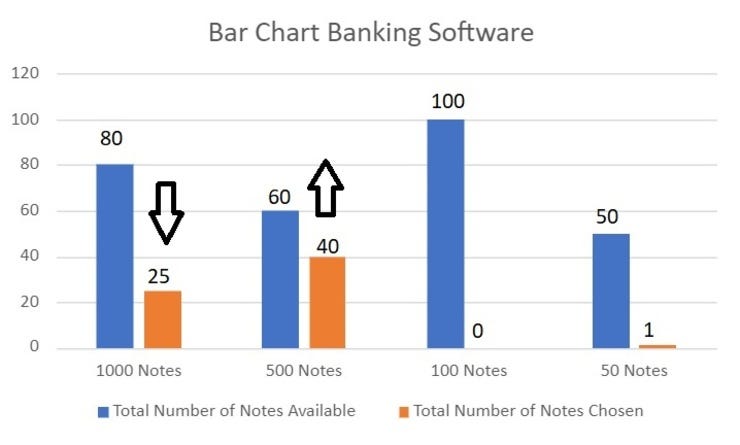
Now, Cashier wants to give 25 notes of 1000 denomination. So, he pulls down the Number of Notes Chosen vertical bar of 1000 denomination to 25 mark, amounting to a total of INR 25,000. This automatically increases the Number of Notes Chosen of 500 denomination to 40 (INR 20,000) and Number of Notes Chosen of 50 denomination to 1 (INR 5), to accommodate the total of INR 45,050.
1000*25 Notes = 25,000
500*40 Notes = 20,000
50*1 Note = 50
Total amount = INR 45,050
As Illustrated in Figure 2.
 |
| Figure 2. Pulling down a Total Number of Chosen Vertical Bar |
Fixing a denomination
Suppose the cashier wants to fix one or more Number of Notes Chosen field of any denomination, he simply presses Fix Number of Notes Chosen on that particular denomination. This fixes the number of notes of that particular denomination.
Explanation with Example
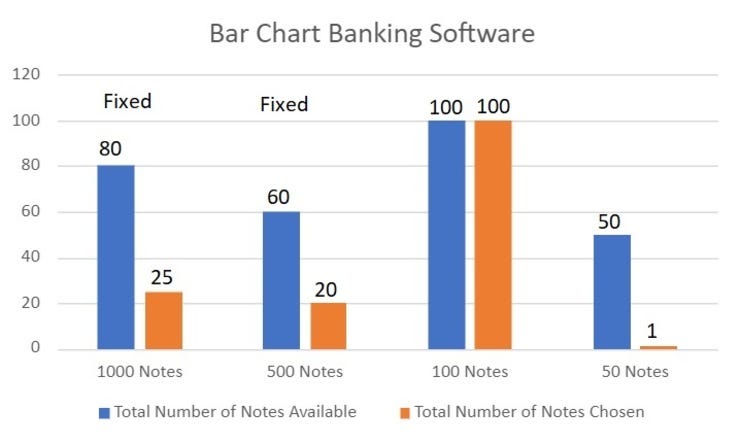
Suppose in the previous example, the Cashier wants to fix the Number of Notes Chosen of 1000 denomination notes as 25 and the Number of Notes Chosen of 500 denomination notes as 20. This automatically increases the Number of Notes Chosen of 100 denomination notes as 100 and the Number of Notes Chosen of 50 denomination notes as 1, to make the total INR 45,050
1000*25 Notes = 25,000 [ Fixed]
500*20 Notes = 10,000 [ Fixed]
100*100 Notes = 10,000 [ Automatically Increases]
50*1 Note = 50
Total amount = INR 45,050
As Illustrated in Figure 3.
 |
| Figure 3. Automatically Bar Adjusting |
Magnetic Attraction
On every Number of Notes Chosen Bar, the cashier can enable a Magnetic hold on a particular Count. This will usually be Counts of 50, 100, 150, 200 and so on. Whenever the Cashier drags the Number of Notes Chosen Bar, it will have a Magnetic Attraction towards those Counts, making the Cashier’s Job easy.
Priority Scale
The cashier can set the priority scale (1 - 10) for every denomination, the way he wants to do it. Usually, the priority scale is more for higher denominations and less for others. But the Cashier can always decide, which will have priority.
Photo Courtesy : logicmanager.com
Support Us: https://supportusbydeepak.blogspot.com/
Comments
Post a Comment